About This Article
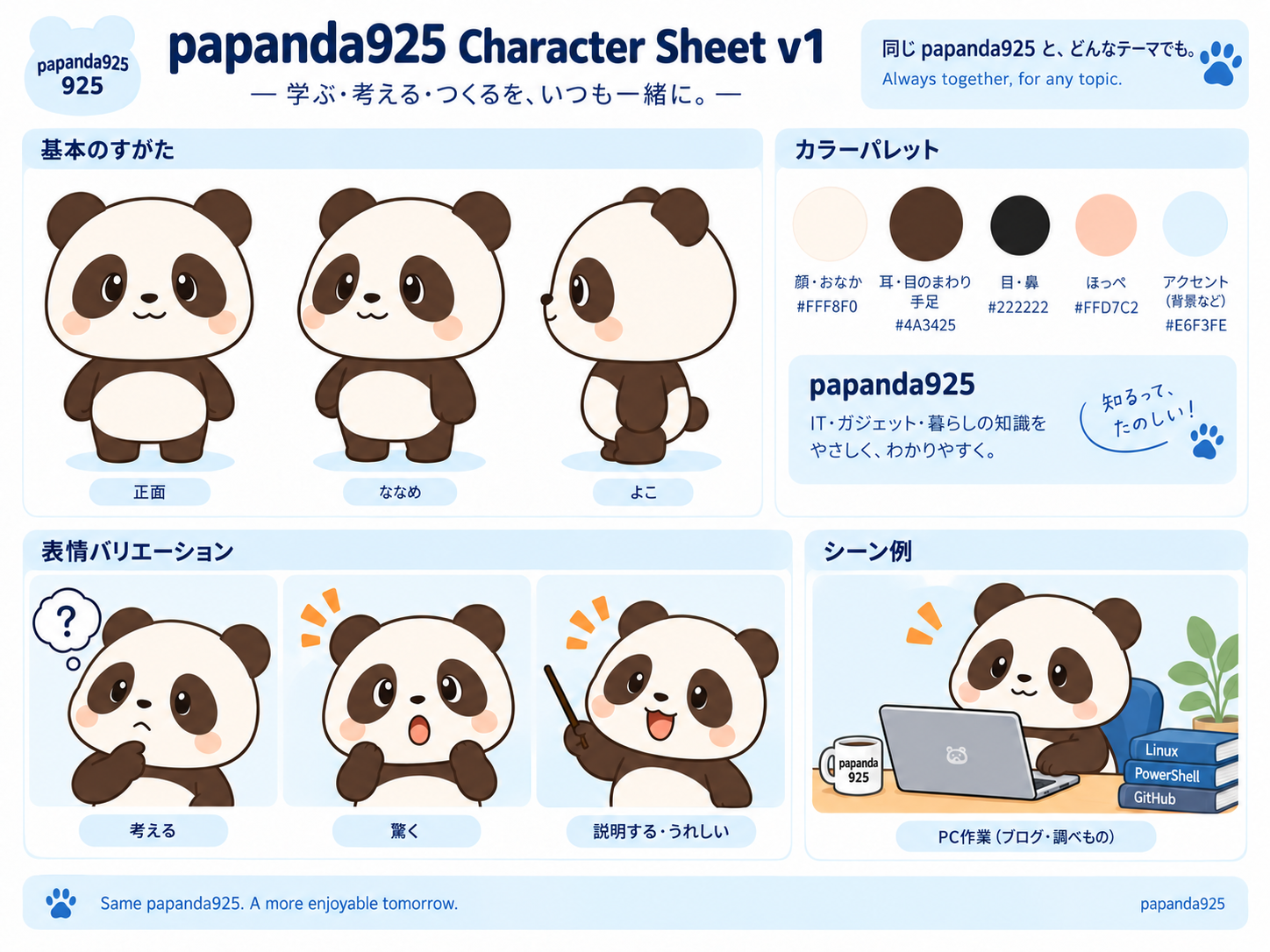
This article was created using an automated generation workflow driven by generative AI. Using the papanda925 Character Sheet v1 as the master reference, we separated the elements to fix from those to change per article, organizing the operational rules, prompts, naming conventions, and quality checks on GitHub for mass-producing blog eyecatches.Verification Status: 🧪 Character Sheet master and GitHub operational rules confirmed / Actual image generation comparison for three themes not yet performed
When generating AI images from scratch for every article, the face, ears, eyes, body shape, and colors change slightly, even when intending to use the same Papanda. What matters in mass production is not "creating the exact same picture every time," but rather:fixing only the core axes that make it recognizable as the same character while varying the scene elements to match the article theme..
In this fourth installment, using papanda925 Character Sheet v1 as the master reference, we organize the workflow to ensure that Papanda remains consistent as the same character even when themes change, such as for PowerShell, Excel, or GitHub / AI.

- Separating What to Fix from What May Change First
- Placing Only One Master Reference on GitHub
- Initial Common Prompt to Use
- What Changes for PowerShell, Excel, and GitHub/AI?
- Prioritize File Names That Make Sense Later
- Review Only Eight Items After Generation
- Avoid Making Every Image Identical Even with the Same Papanda
- Integrating into the Automated Generation Pipeline
- Placed Templates on GitHub
- Conclusion
Separating What to Fix from What May Change First
The first thing to decide during mass production is "what not to change."
| Fixed Elements | Variable Elements |
|---|---|
| Facial features | Article theme |
| 2-to-3-head-tall body proportions | Background |
| Dark brown ears, eye surrounds, and limbs | Props such as PCs, smartphones, spreadsheets, and code |
| Cream color for face and belly | Expressions |
| Large, glossy eyes | Poses |
| Light pink cheeks | Camera position and composition |
| Gentle anime and chibi character style | Short heading text |
If the Character Sheet side is changed for every article, the meaning of the master reference is lost. Variations are created using backgrounds, props, poses, expressions, and compositions.
Placing Only One Master Reference on GitHub
The current master references are the following two:
CHARACTER_SOURCE.md For example, the following are fixed:
Face and belly:
#FFF8F0Ears, eye surrounds, and limbs:
#4A3425Eyes and nose:
#222222Cheeks:
#FFD7C2Slightly horizontal, soft facial outline
Large, glossy eyes
Small mouth
2-to-3-head proportions
Instead of having separate "Papanda definitions" for the blog body, manga, and eyecatches, this serves as the reference source.
flowchart TD
    A[Character Sheet v1] --> B[固定要素を読む]
    C[記事テーマ] --> D[背景・小物・ポーズを決める]
    B --> E[画像生成プロンプト]
    D --> E
    E --> F[生成画像]
    F --> G[正本との差をチェック]
    G --> H[GitHubへ保存]
    H --> I[WordPress / SNS / OGPへ利用]
Initial Common Prompt to Use
Instead of rewriting the entire prompt for each theme, we separate the common parts from the differences.
添付の papanda925 Character Sheet v1 をキャラクターの正本として使う。
Papandaの顔立ち、体型、配色、目、ほっぺ、アニメ調は維持する。

今回の記事テーマは「{ARTICLE_THEME}」。
背景、小物、ポーズ、表情だけをテーマに合わせて変える。

ブログのアイキャッチとして、縮小しても主題が分かる構図にする。
文字を入れる場合は短くし、記事タイトル全文を画像へ詰め込まない。
With this format, the differences per article center around {ARTICLE_THEME} and the scene instructions.
What Changes for PowerShell, Excel, and GitHub/AI?
For this round, we placed differential prompts usable for actual generation across three themes on GitHub.
PowerShell
ARTICLE_THEME = PowerShellでWindowsを操作する
背景はデスクトップPCとターミナル。
PapandaはノートPCを操作し、画面には短いPowerShellコードを表示する。
青系のアクセントを使う。
What changes here are the PC, terminal, code, and blue accents. The color scheme of Papanda itself is not changed to blue in a PowerShell style.
Excel
ARTICLE_THEME = Excelでデータを整理する
背景は表計算シートと簡単なグラフ。
Papandaは表を指し示すポーズ。
緑系の表計算モチーフを小物として使う。
An Excel-like feel is expressed through tables, graphs, and green accents. The key is not shifting the character itself toward green.
GitHub / AI
ARTICLE_THEME = GitHubと生成AIで記事制作を自動化する
背景はコード、Gitの分岐、AIを連想する抽象的なUI。
Papandaは説明する・うれしい表情。
青〜水色のアクセントを使う。
Rather than adding a multitude of robot or brain illustrations every time because it is an AI article, narrowing it down to two or three elements such as code, Git, and abstract UI ensures that the subject remains clear when displayed at a reduced size.
In the current automated execution environment, we have not actually generated AI images for these three themes and saved them to GitHub. Therefore, this is not treated as having "generated and compared three images." What has been confirmed this time includes the master image, fixed/variable rules, prompt templates, and GitHub management.
Prioritize File Names That Make Sense Later
When the number of images increases, they cannot be tracked with image1.png or final2.png.
assets/eyecatch/YYYYMMDD-<slug>-eyecatch.png
For example,
assets/eyecatch/20260913-powershell-console-eyecatch.png
assets/eyecatch/20260913-excel-data-eyecatch.png
assets/eyecatch/20260913-github-ai-eyecatch.png
include the date and theme as in .
By making it possible to track image masters and derivatives on GitHub, you can verify later what criteria were used to create the images for a given article.
Review Only Eight Items After Generation
Constantly agonizing over minor details during high-volume generation halts operations. Therefore, pre-publication checks are fixed to eight items.
Does the facial outline turn into a different character?
Are the ears, eye surrounds, and limbs based on dark brown?
Do the eye shape, gloss, and cheeks deviate significantly from the master reference?
Are the 2-to-3-head body proportions maintained?
Are the props representing the theme limited to about one or two?
Can Papanda and the article theme be distinguished even when scaled down?
Is there too much text packed in?
Are the background and pose too similar to recent images?
Rather than just asking "is it cute?" the key is to separately evaluate the difference from the master reference and how clearly the article theme is conveyed..
Avoid Making Every Image Identical Even with the Same Papanda
Using Character Sheets can conversely make it easy to produce overly similar compositions.
Therefore, instead of changing the character itself every time, vary only two to three of the following axes.
| Axis | Example |
|---|---|
| Camera | Frontal / Angled / Slightly zoomed out |
| Pose | Operating PC / Pointing / Thinking / Surprised |
| Background | Desk / UI / Abstract diagram / Documents |
| Props | PC / Smartphone / Table / Code / Git |
| Composition | Papanda on left / Papanda on right / Center |
This balances being "the same character" with having "differences per article."
Integrating into the Automated Generation Pipeline
On the blog generation side, instead of recreating the Character Sheet itself every time, the reference destination is fixed.
記事テーマ
  ↓
カテゴリ・キーワード抽出
  ↓
Character Sheet v1を固定参照
  ↓
背景・小物・ポーズの差分だけ生成
  ↓
画像生成
  ↓
8項目チェック
  ↓
固定命名でGitHub保存
  ↓
記事本文・OG候補へ利用
Maintaining this separation allows version control over "when the master reference was switched" if creating Character Sheet v2 in the future.
Placed Templates on GitHub
We compiled the common prompts, differential examples for PowerShell / Excel / GitHub & AI, naming conventions, and pre-publication checks into Daily-Code-Samples.
When adding actual images in the future, we will ensure they remain trackable from the same location as this README.
Conclusion
What is fixed during mass production using Character Sheets is not the entire image, but character identity.
By fixing Papanda's face, body type, color scheme, eyes, cheeks, and anime style, while changing the background, props, expression, pose, and composition per article—and further establishing post-generation checks and file naming conventions—operations become resilient against breakdown even as the number of articles increases.
Part 1 covered manga presentation, Part 2 explored the concept of making the Character Sheet the master reference, Part 3 addressed inconsistencies when generating multiple instances of the same Papanda, and Part 4 expanded into mass-production operations. From here onward, this same mindset can be applied to expand into Character Sheet version control and horizontal deployment for OG images and social media graphics.